Every capability, one connected record.
From first capture to final sign-off — one audit trail a client, an auditor, or a lawyer can follow.
IssuesId tracks defects, inspections and quality — offline in the field, tamper-proof at handover.
Get it down the moment you see it
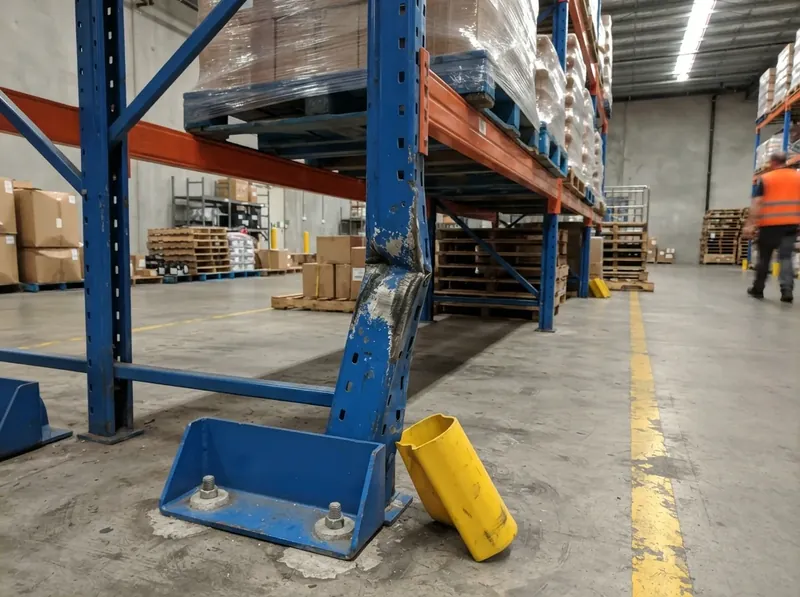
One tap for photo, location, priority, and trade — in the field, the plant room, or aisle 12. The record starts where the problem is.
- One-tap photo, location, priority, and trade
- Defect / variation / backcharge categorisation
- Role-gated lifecycle with full per-issue history
The photo fills in the form
Add a photo to a new defect and the description, classification and priority are suggested in seconds. Each is marked as a suggestion, and anything you change stays changed.
A short description drafted from the photos · Only your project’s own classifications · Never overwrites what you’ve typed
Annotate photos and drawings with voice
Mark exactly what’s wrong, exactly where it is, without typing on a phone in the rain.
Pin, circle, arrow, and text · Voice-to-text captions · Every markup stays on the record
Work offline, sync automatically
Basements, lift shafts, and cold stores don’t have signal. Your tracking shouldn’t care.
Full offline capture · Background sync on reconnect · Installs to home screen — no app store
QR-code every location
Print a code, stick it on a level or a rack, scan it to land in the right list.
Project-wide or per-location codes · Avery 21-up / 20-up sheets out of the box · Revokable and audit-logged
Your drawings become your locations
Upload the floor plan PDF and the level and room names are read off it into a suggested location tree. You fix what it got wrong and commit — nothing reaches the project until someone has looked at it.
PDF in, location tree out · Every suggestion reviewed before it’s created · Re-scan on a new revision, merge or replace
Inspections that hold up in handover
Standardise the walk-through once — apartment handover, rack audit, plant-room check — run it on every job, and leave with every fail already raised.
- Reusable safety, quality, and pre-handover templates
- Hold points that stop the job until they pass
- Failed items auto-create linked defects
A name and a time on every sign-off
Sign-off is a status only the right role can set, stamped with who set it and when — not a scanned sheet in a folder somewhere.
Role-gated — trades can’t sign off their own work · Signer and time on the record · Every transition kept in the history
Failed items become defects on the spot
Tick fail and the defect already exists — linked to the checklist item before you’ve left the room. Close that defect and the item flips back to pass on its own.
Auto-created and linked · Carries photos and location · Re-passes when the defect closes
One walk-through, written once
Build the checklist once, then run the same standard on every unit, rack, or plant room after it. Mark the questions that are hold points and the job waits on them.
Reusable templates · Safety, quality, and pre-handover · Hold points flagged on the question
Send a subbie the part they have to answer
Issue a link against a checklist and it emails to the contractor’s contact. They answer with no login and no account — and the link only ever opens the live stretch of the checklist: after the last hold point that passed, up to the next one that hasn’t.
No login, no account, no app · Reminders before the due date and after it passes · Revoke, extend, or re-send at any time
Every checklist on every job, in one list
One page across the whole organisation. Filter by project, by location, by last activity, and by whether it’s not started, in progress, or done — each row carrying its answered-of-total and flagging any hold point still outstanding.
Org-wide, across every project · Answered of total on every row · Outstanding hold points marked
Run the job without the paperwork
Issue work, track progress, and export line items straight into your cost system — while the daily log writes itself.
- Cost-coded line items with unit pricing
- Contractor assignment with status tracking
- Backcharge flag separates warranty from billable
Project milestones, ticked off with a name and a time
Name the dates that matter — slab down, lock-up, PC — and tick them off as they land. The tick records who set it and when, and keeps that record even if the milestone gets renamed later.
Named per project, in project settings · Tick records who and when · Renaming never rewrites the history
A daily log in about a minute
Weather fills itself in. Workforce, plant, delays, and visitors take a minute — or copy yesterday and adjust.
Auto-filled weather · Copy yesterday and adjust · Feeds the gallery and timesheets
One photo gallery per project
Photos from issues and the daily log land in one gallery — not in someone’s camera roll.
Grouped by date, captioned · Fed automatically · Download originals for handover
Timesheets straight from the daily log
Hours logged once roll up into payroll-ready timesheets — never retyped.
Per-employee, by week or month · Derived from daily log labour · One-click CSV for payroll
Conversations that live on the record
Every question, reply, and photo exchanged with a contractor stays threaded on the issue it belongs to — not lost in email.
Per-issue threads · Contractors reply via email magic-links — no login · Full history kept on the record
RFIs, threaded and trackable
Stop losing design questions in email. Every RFI lives in a threaded, attributable conversation.
Open → responded → closed, re-openable · Inbox / Sent / Drafts views · Linked to the drawing or defect
Project correspondence on the record
The formal paper trail — delays, variations, claims — threaded at project level next to the daily log, every post timestamped.
Typed threads: general, RFI, delay, variation, claim — filterable · Staff plus invited externals reply via email magic-links — no login · Attach from project photos, documents and drawings — email sends logged
The record you can stand behind
Send the document, get a timestamped acknowledgement back. When there’s a dispute, you’re the one holding the register.
- Acknowledgement-required distributions
- Timestamped, immutable acknowledgement records
- Audit trail for variation and claim disputes
Document and drawing register
One source of truth, with revisions you can prove.
Immutable revision history · Withdraw-not-delete for compliance · Markups anchored to their revision
SWMS on file before anyone starts
Keep a contractor’s safe work method statements on the company record, each one carrying a note about what it covers. Assign that company to a project and its SWMS come across in the same breath as the assignment — nobody re-uploads anything per job.
A SWMS library per contractor · Attached at assignment, detachable per project · Deleting one tells you how many projects use it first
The wall sheet: the whole job, level by level
Expand a building into levels and levels into rooms, with every row carrying its own totals — open items, checklists, documents, drawings — rolled up from everything underneath it. Filter by trade or date range and the whole tree re-counts.
Expand in place, seven levels deep · Trade and date-range filters · A link straight back to any point in the tree
Every number opens the list it counted
Click a total and the items behind it slide out — answered by the same query that produced the number, not a second one written to look like it. Export the sheet and the CSV matches the screen cell for cell.
The count and the list can’t disagree · CSV of the current zoom and filters · Totals you’re not cleared to see are absent, not zero
Fifteen reports, in the format the reader wants
Work lists, quality and progress, defect detail, cost, raw data. PDF for the client, Excel or CSV for the spreadsheet.
QC, issued-to, executive, door sheet, wall chart, line graph · Five categories, one catalogue · Role-filtered — safe for every user
See the count before you generate
Narrow by location, status, trade, cost attribute, or any of fourteen filters, and the match count updates as you go. It runs the same query the report runs, so it can’t disagree with the output.
Fourteen filter dimensions · Live match count · One project, several, or by manager
Save it once. Or schedule it and stop thinking about it.
Name a report configuration, share it with the team, run it in one tap. Or set it to daily, weekly, or monthly and it arrives by email with nobody logged in.
Named, shareable configurations · Daily, weekly, or monthly delivery · Pauses honestly if the owner loses access
Every run accounted for
A tray follows the job across the app with live progress, an ETA and a cancel button. History keeps every past run — who ran it, what it covered, how big it was, who it emailed.
Live progress, ETA, queue position, cancel · Full history, searchable and filterable · Re-run any past report with today’s data
Search across the registers
One bar. Projects, issues, contractors, documents, and users — in a single query.
Cross-entity search · Scoped to your team and role · Grouped by record type
Fits your team — and the software you already run
Seven roles, one platform. Everyone from the client to the contractor sees exactly what they should — nothing else.
- Role-tailored dashboards per user type
- Your contractors see their work — nothing else
- Invite subbies and clients without exposing the project
Call them defects, or call them inspections
Some teams snag defects; some run inspections. One setting changes the word across the menu, the dashboards, the reports, the notification emails, and the pages you send to people outside your team.
Two presets, set once in org settings · Follows into reports, emails and shared links · Filters, exports and integrations unchanged
Trades see their work and nothing else
A trade opens a worst-first list of its own assignments — no project register, no other trades, no costs. To move an item to fixed it has to attach the photo.
Only their own companies’ assignments · Photo evidence required to mark fixed · Same view whether they log in or use the emailed link
Trades onboard themselves
A trade already on your contractor list gets a correctly scoped account in your organisation straight from the notification email — not a brand-new company of their own. Work for three builders and they stay in the one they picked.
Email-matched to your contractor list · Lands in your org, not a new one · No admin on your side
Residents raise their own defects
A tenant sees the defects on their own unit and nothing else — no costs, no contractor names, no status buttons. They raise, photograph, and follow along.
Scoped to their residence only · Photos attached from the phone · Cannot change a status by any route
Workflow rules that work for you
Automate the routine so the team can focus on the work.
Conditional rules across attributes · Auto-assign, notify, and escalate · Guard rails stop rules looping
Sync with the software you already run
IssuesId syncs both ways through the API — keep your old system running until you don’t need it.
Bidirectional defect sync · Encrypted credentials, background sync · Per-project workspace mappings
Email that doesn’t get lost
Assignments, replies, sign-offs, and approvals all hit inboxes — branded, templated, deliverable.
Per-organisation templates · Queued delivery with retry and bounce handling · Sent from your own domain
See it running on one of your projects.
Thirty minutes, your projects, your record — or start a pilot on one live project and keep whatever it captures.
Still comparing options? The guide to construction defect management software covers the capture-to-handover workflow, an example defect report, and the six things worth testing on a live job. If your site calls it snagging, the snagging software page walks the same product from the practical-completion walk to the signed-off list. If your question is what happens on a phone with no signal, the mobile defect tracking app page answers it, conflicts and all.
Every capability above has documentation behind it: how a defect is captured and numbered, how an inspection checklist is built and run, how a work order reaches a contractor, and how RFIs, non-conformances and timesheets attach to the same record. If you are weighing a tracker against a management tool, the difference shows up after capture.